
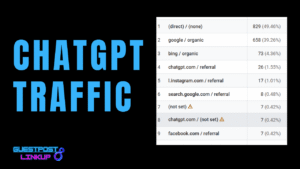
What Is ChatGPT Referral and ChatGPT “Not Set”Traffic in GA4
Over the past year, many site owners, SEOs, and marketers have started noticing a new and slightly confusing pattern inside Google Analytics 4. When filtering traffic acquisition reports by medium or source, two unfamiliar entries begin to appear: ChatGPT referral and ChatGPT “not set” traffic.
At first glance, this creates more questions than answers. Is ChatGPT sending traffic? Why does some of that traffic appear as referral while some shows are not set? And most importantly, how should this chatgpt traffic be interpreted inside GA4?
This article explains how GA4 tracks ChatGPT traffic, why ChatGPT referral in GA4 looks different from traditional sources, and whether ChatGPT traffic is referral or direct. It also breaks down what ChatGPT “not set” traffic actually means and also important things you need to know while tracking Chatgpt and other ai traffic like gemini , perplexity etc.
Understanding How GA4 Tracks Traffic
GA4 tracks website traffic mainly using UTM parameters and basic source information.
UTMs stands for Urchin Tracking Module,are small tags added to a URL that tell GA4 where a visitor is coming from, like search, social media, email,campaign or another website.
If UTMs are present, GA4 follows them first; if not, it tries to guess the source based on how the user landed on the site.
Example of UTM:
https://example.com?utm_source=facebook&utm_medium=social&utm_campaign=spring_sale
Here:
- utm_source = facebook
- utm_medium = social
- utm_campaign = spring_sale
Why GA4 Sometimes Gets Confused
GA4 only knows what the browser tells it.
If:
- Source info is blocked
- Link opens in an app or embedded window
- Privacy settings hide data
Then GA4 loses clues and may mark traffic as:
- Direct
- Not set
That doesn’t mean traffic is fake — it just means GA4 didn’t get enough information.
How GA4 Tracks Traffic
Think of GA4 like a security guard at your website’s door.
When someone enters, GA4 just asks one basic question:
“From where did you come?”
Based on the answer, GA4 puts that visitor into a bucket.
1. Direct Traffic (No Clues Given)
What it means:
GA4 has no idea where the visitor came from.
Common examples:
- Someone types your website URL directly in the browser
- Someone clicks a saved bookmark
- Someone clicks a link where the source info is missing
Simple way to understand:
It’s like someone walked into a shop without telling who sent them.
So GA4 says:
Okay, direct traffic.
2. Organic Traffic (Search Engines)
What it means:
The visitor came from a search engine like Google,Yahoo or Bing.
Common examples:
- Someone searches a keyword on Google
- Clicks your website from search results
GA4 can see:
- “This person came from Google”
- So it marks it as organic traffic
GA4 does not know the exact keyword (that’s normal).
3. Referral Traffic (Other Websites)
What it means:
The visitor clicked a link from another website.
Common examples:
- A backlink from a blog
- A forum post
- A tool dashboard
- A website mentioning your link
GA4 sees:
- “This user came from this website”
- So it marks it as referral traffic
This is also how ChatGPT referral sometimes shows up.
4. Social Traffic (Social Media)
What it means:
The visitor came from platforms like Facebook, Twitter, LinkedIn, etc.
Common examples:
- Clicking your link from a Facebook post
- Clicking a bio link on Instagram
GA4 either:
- Reads special tracking info (UTM), or
- Recognizes the social platform automatically
How ChatGPT Traffic Shows Up in GA4 (Chatgpt Referral and Chatgpt Not set traffic)
When someone asks ChatGPT for a specific link to your website, ChatGPT usually provides the URL without adding UTMs. Since there’s no UTM, GA4 can’t tell where the traffic is coming from. In most cases, this traffic ends up as “not set”, and sometimes it may even appear as direct.
On the other hand, when ChatGPT gives your site as a citation or reference inside an answer, it may include its own tracking info (UTM-like data). GA4 can read this and classify it properly, which often shows up as ChatGPT referral.
So, in simple terms:
- Not Set → someone asked for your link directly, no UTMs added.
- Referral → ChatGPT cited your website with tracking info.
This is based on my personal research and experiments, but it explains why GA4 shows traffic in these two different ways from ChatGPT.
How ChatGPT Decides to Give Citations
Sometimes ChatGPT gives a citation when it answers a question, and sometimes it doesn’t. The same goes for other AI tools. Right now, there’s no way for us to predict it.
But one thing is clear: ChatGPT isn’t random. There must be some process or logic in its code that decides whether to show a citation or not. We just don’t know the exact rules yet.
From what I’ve seen:
- It may give one citation, a few, or none at all depending on the question.
- The decision seems based on how the AI evaluates sources and relevance, but the exact parameters are hidden.
- Understanding this helps explain why some ChatGPT traffic shows as referral (when a citation exists) and some as not set (no citation).
In short: we cannot yet predict or control when ChatGPT will cite a website, but recognizing this pattern is key to better tracking and understanding AI-driven traffic.
Important point: If you ask for a list or options—for example, “Give me the top 10 best pharma companies”—ChatGPT will most likely provide citations or links along with the answer.
Is ChatGPT Traffic “Not Set “ or “Direct” in GA4? (When user ask for links)
Most people think ChatGPT traffic goes into Direct, but in reality, that’s not how GA4 is handling it.
From my analysis and project-level observations, ChatGPT traffic mostly lands in “not set,” not Direct.
Here’s the key detail many miss:
When GA4 shows ChatGPT (or chatgpt.openai.com) in traffic exploration, it means GA4 has already identified the source. It knows the user came from ChatGPT. What it fails to decide is the medium.
So GA4 is basically saying:
“I know this user came from ChatGPT, but I don’t know whether to call it referral or direct.”
That’s why it ends up as ChatGPT + not set.
This also explains why ChatGPT traffic is not truly Direct. Direct traffic usually means GA4 has no source at all. In this case, GA4 clearly knows the source — it’s just confused about classification.
From a behavioral point of view, ChatGPT traffic acts like referral traffic. But due to missing UTMs, app-based clicks, and referrer inconsistencies, GA4 cannot confidently label it as referral every time.
So the most accurate way to understand this is:
- Intent-wise → ChatGPT traffic is referral
- Technically in GA4 → It mostly shows as not set
- Occasionally → It may fall into Direct due to fallback logic
This isn’t a tracking error. It’s a limitation of GA4 trying to fit AI-driven traffic into old attribution rules.I hope now you understand Is ChatGPT traffic referral or direct?
Are ChatGPT Bots more advanced then Google bots ?
In one of my projects, I was facing a lot of bot traffic, so I decided to block bots through cloudflare. The idea was simple: stop bad bots and keep the website clean and fast.
After applying those rules, something very normal happened first —
even good bots like Googlebot were partially blocked. We saw crawling slow down, and it was clear that Google follows clear rules: if access is restricted, it steps back.
But then we noticed something interesting.
ChatGPT traffic was still coming in.
Not only that, the sessions coming from ChatGPT showed good engagement — users were staying on the page, reading content, and interacting like real visitors. This clearly showed that ChatGPT is not behaving like a traditional crawler that just scans pages and leaves.
From this, one thing became very clear to me:
ChatGPT bots are much more advanced than regular search engine bots.
They don’t rely only on simple crawling rules. Even when many bots are blocked, ChatGPT is still able to access, understand, and recommend content. This means it works more like an intelligent system rather than a basic search bot.
So when people say AI traffic is “just another bot,” that’s not true.
ChatGPT doesn’t just crawl — it understands, processes, and then sends real users to your website.
And that’s exactly why its traffic behaves differently in GA4 and why traditional SEO tracking often fails to explain it properly.
Gemini & Perplexity Traffic Is Clearly Visible in GA4
Why These AI Tools Are Easier to Track Than ChatGPT
Unlike ChatGPT, Gemini and Perplexity send much cleaner signals to GA4. When users click links from these platforms, GA4 is usually able to identify where the traffic is coming from without much confusion.
In most cases:
- Perplexity traffic appears as Referral traffic
- Gemini traffic also shows up clearly as Referral or Source/Medium
This happens because both Gemini and Perplexity consistently pass referral data when they send users to a website. When a link is clicked, GA4 receives enough information to correctly classify the session.
That’s why, when you check Traffic Acquisition → Session source/medium, you’ll often see:
- perplexity.ai / referral
- gemini.google.com / referral (or similar Google-owned sources)
This makes tracking performance much easier. You can clearly see:
- How many users are coming from these AI tools
- Which pages they land on
- Engagement rate and conversions
Compared to ChatGPT, there’s far less “Unassigned” or “Direct” confusion here.
The main reason is simple:
Gemini and Perplexity behave more like search or discovery platforms, while ChatGPT behaves more like an assistant inside a closed environment. Because of that, Gemini and Perplexity pass tracking signals more consistently, while ChatGPT traffic often loses attribution along the way.
So if you’re checking GA4 and wondering why AI traffic looks clean for Gemini and Perplexity but messy for ChatGPT, this is exactly why.
Important Note : Gemini and perplexity always show links or citation (most probably)
Conclusion
I hope this blog helped you clearly understand what ChatGPT referral traffic is and what ChatGPT “not set” traffic actually means in GA4. Everything shared here is based on my own observation, analysis, and hands-on project work, not assumptions. The more you analyze this data yourself, the clearer these patterns become. The real missing piece is still how ChatGPT decides when to give citations and when it doesn’t — once we crack that logic, improving ChatGPT visibility and rankings will become much easier. If you’ve done any research, testing, or noticed similar patterns, feel free to share your findings in the comments , it could help all of us understand this better.